PUBG URCCONTROL CENTER

Server synchronization

Tune it once.Stay in flow.

Profiles, hotkeys, maps, updates, and support work as one system. You set the parameters — the application preserves your working rhythm between sessions.

Current promo code
PROMO-UVEYGSVW

54 of 55 left · 36 h of access

WINDOWS / .NETYour profile follows you

Settings, calibrations, and access return from the server in every new session.

CONTROL SURFACE

Ten screens. One working rhythm.

Select a module and explore the real application interface. No concepts — only current product screens.

Theme
Accent
PUBG URC / MATRIX— □ ×
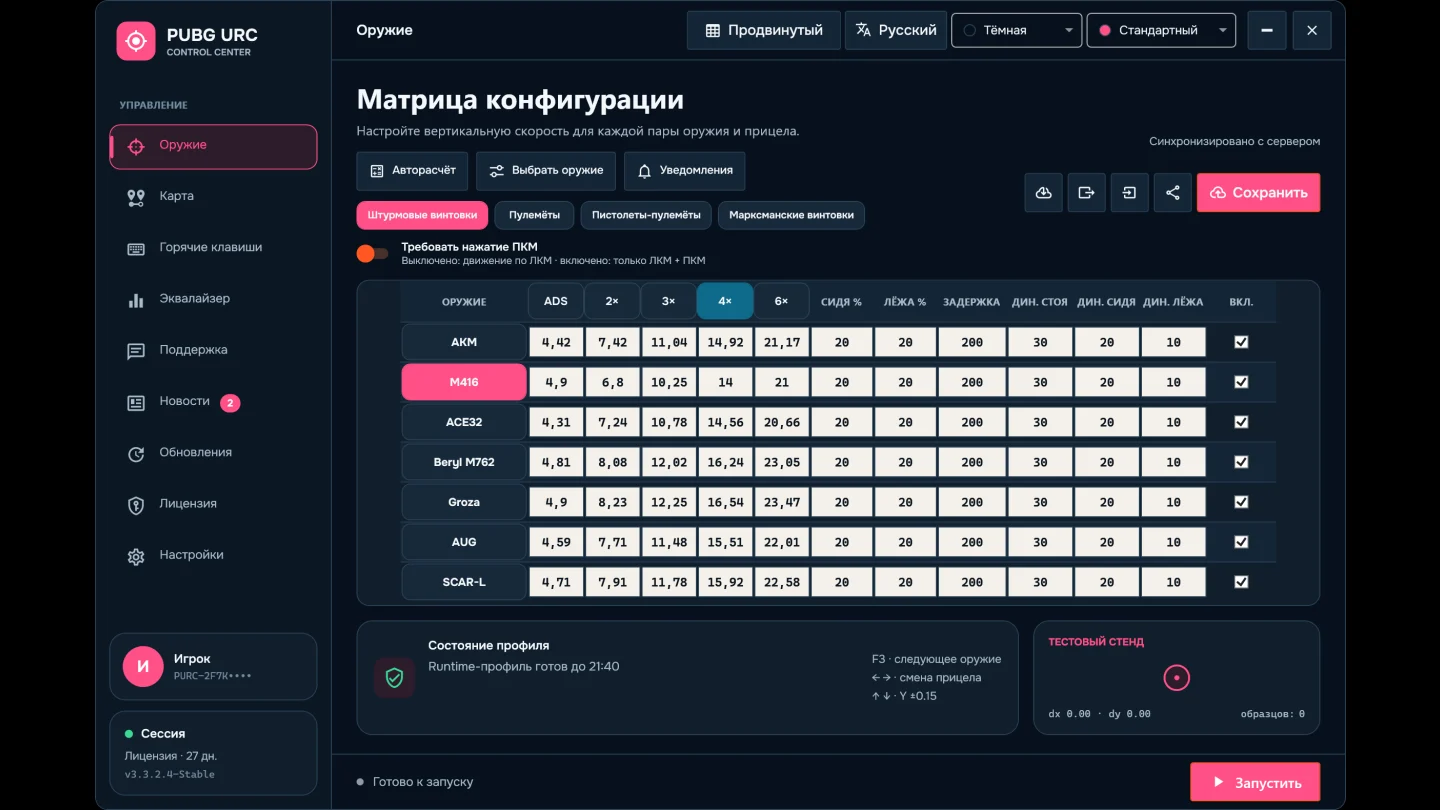
Profile matrix
PROFILE / LIVE

Profile matrix

Every configuration value stays visible on one plane — no buried tabs.

YOUR ROUTINE

Three steps to a ready control surface.

Three clear steps separate first launch from a ready working profile.

  1. 01

    Activate

    Enter a license key or promo code on the first launch.

  2. 02

    Build your profile

    Choose configurations, set values, or run automatic calculation.

  3. 03

    Run from the tray

    Start the mode and keep the controls available through hotkeys.

FULL GUIDE

Every feature in detail

Everything the application does, topic by topic. Select a topic to expand it.

STARTFirst launch and activationOne file, a key or promo code — and the control center opens.
  • The application is a single EXE for Windows 10 and 11 (64-bit). No .NET or other components to install.
  • On the first launch enter a license key or a promo code. The main window opens only after the server has verified it.
  • The key is stored on the computer, encrypted by Windows. Later launches sign in on their own.
  • A promo code grants access for the number of hours it specifies.
  • When a new version is out, the application offers the update before sign-in.
  • Only one copy runs at a time: two copies would both move the cursor.
MATRIXWeapon and scope matrixA value of its own for every weapon and scope pair and every stance.
  • Weapons are grouped into AR, LMG, SMG and DMR. Each weapon has a vertical Y speed for every scope: ADS, 2×, 3×, 4× and 6×.
  • Columns follow the weapon: submachine guns have no 6×, the VSS has a single Standard column.
  • Crouch and prone each get their own speed reduction in percent.
  • Dynamics: after a delay you set in milliseconds, speed rises by the given percentage — separately for standing, crouch and prone. A switch enables it per weapon.
  • Every edit is saved to the server automatically. An invalid value is highlighted and never sent.
  • “Choose weapons” sets the list F3 cycles through, so unused weapons stay out of the way.
  • Profiles can be exported to a file and imported back.
  • Share your matrix with a friend by code, and bring back any of its last 30 versions with one button.
AUTOServer auto calculationEnter your in-game settings — the server fills in the whole matrix.
  • “Take from PUBG” fills in the sensitivity from the game settings: vertical multiplier, ADS and 2×, 3×, 4×, 6× scopes. The sliders still work too.
  • When the sensitivity changes in the game, the application notices and offers to recalculate the matrix.
  • If every scope shares one sensitivity in the game, switch on a single 2×–6× value.
  • The server calculates the complete matrix; the application applies and saves it at once.
  • If the calculation fails, the sheet stays open with your values — nothing to type again.
  • Any value can still be fine-tuned by hand afterwards.
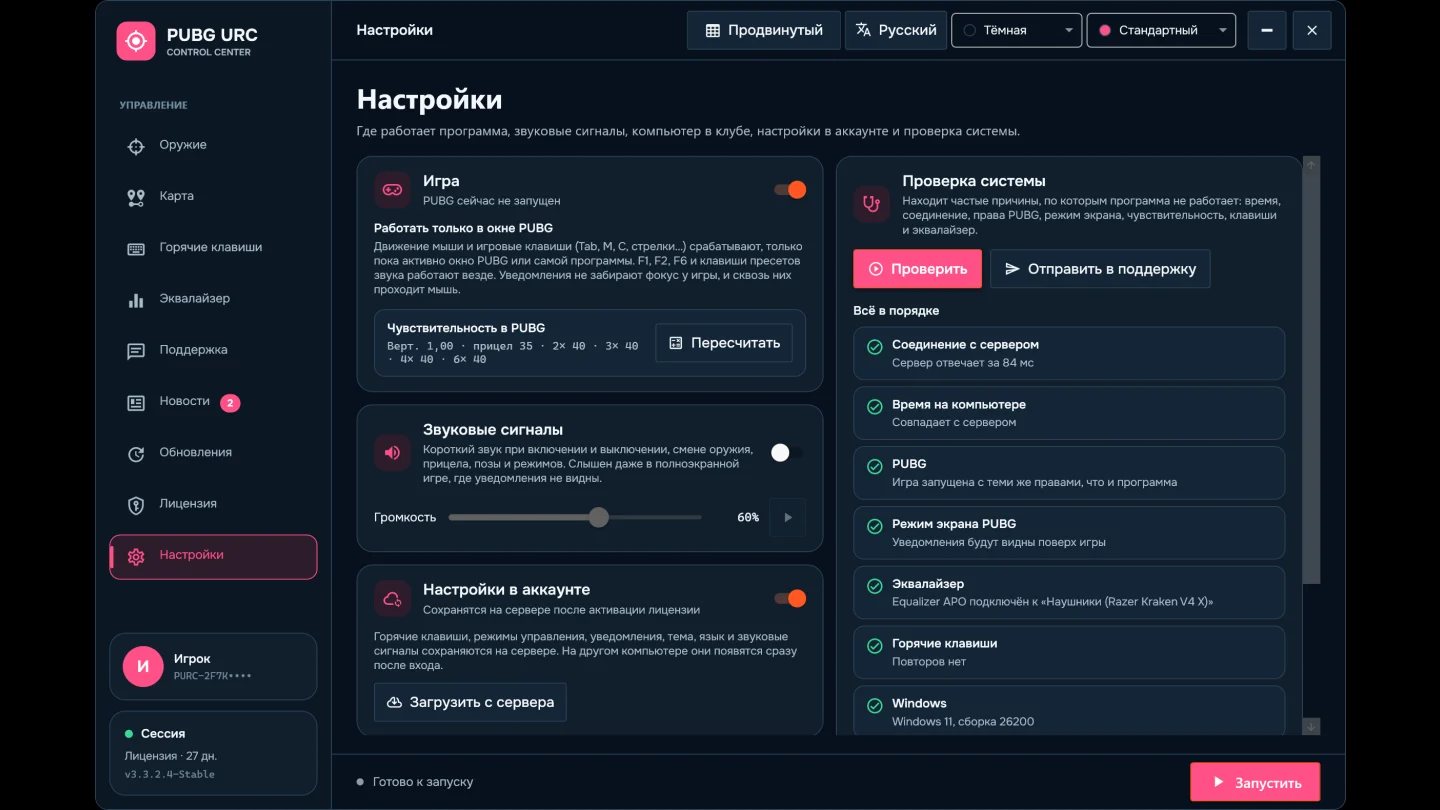
RUNUsing it while you playPress F1 and the application runs from the tray, out of your way.
  • F1 turns the mode on and off. You can close the main window — the application stays in the tray and everything is driven by hotkeys.
  • Movement runs while LMB is held. “Require RMB” limits it to LMB + RMB; RMB itself works as hold or as a toggle.
  • F2 is the emergency stop: the mode switches off immediately.
  • Weapon, category, scope and stance changes apply on the fly, without restarting the mode.
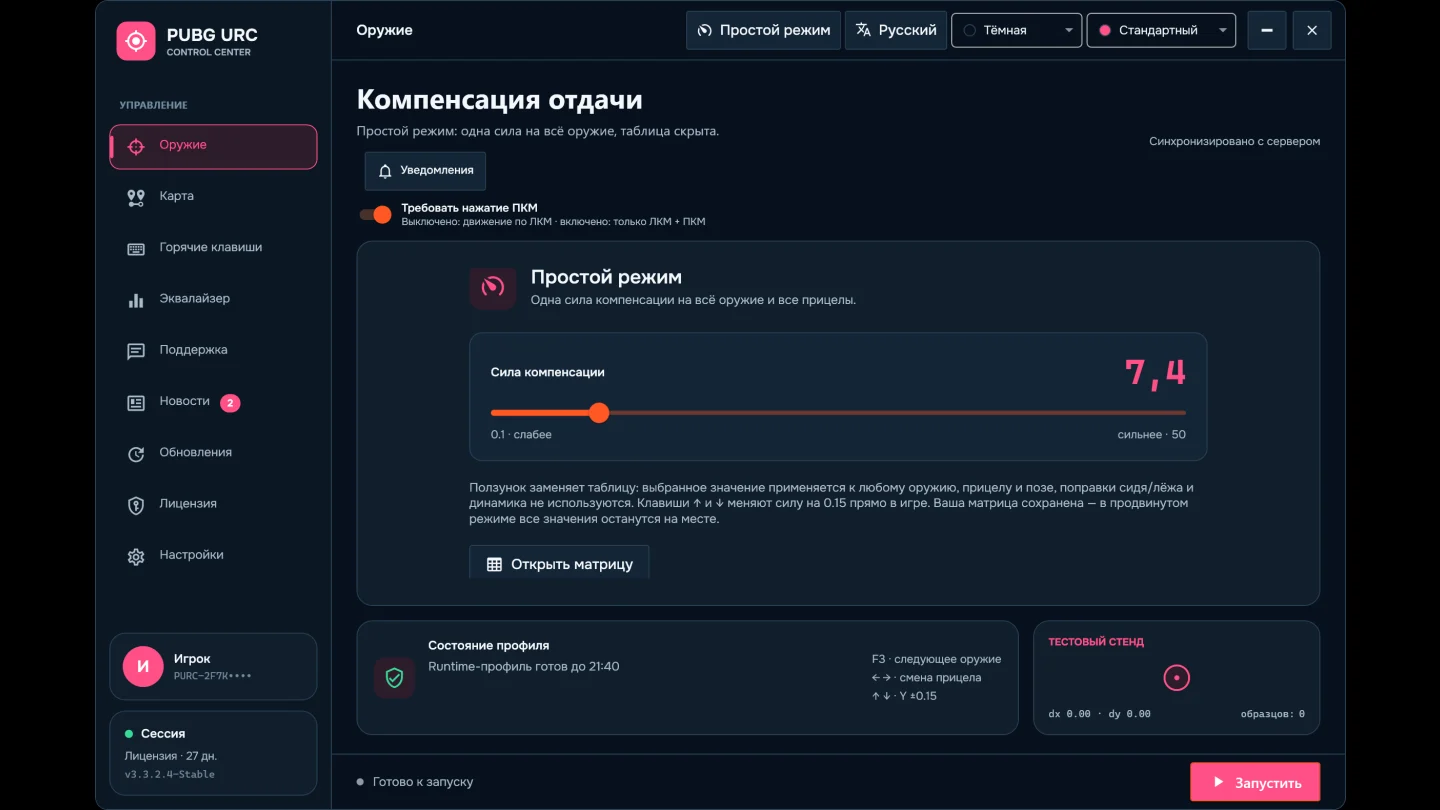
  • The ↑ and ↓ arrows change the current scope’s Y speed by 0.15 in game; the value is saved right away.
  • Inventory (Tab) and map (M) pause movement. Leave with the same key or Esc and it resumes on its own.
  • Overlay notifications never take focus from the game, and clicks pass through them. Pick their screen corner and which kinds to show.
  • The mouse and game keys work only in the PUBG window, so Tab in a browser or C in a chat changes nothing. F1, F2 and the sound keys work everywhere.
  • Sound cues confirm turning on, turning off and weapon changes — audible even in exclusive fullscreen.
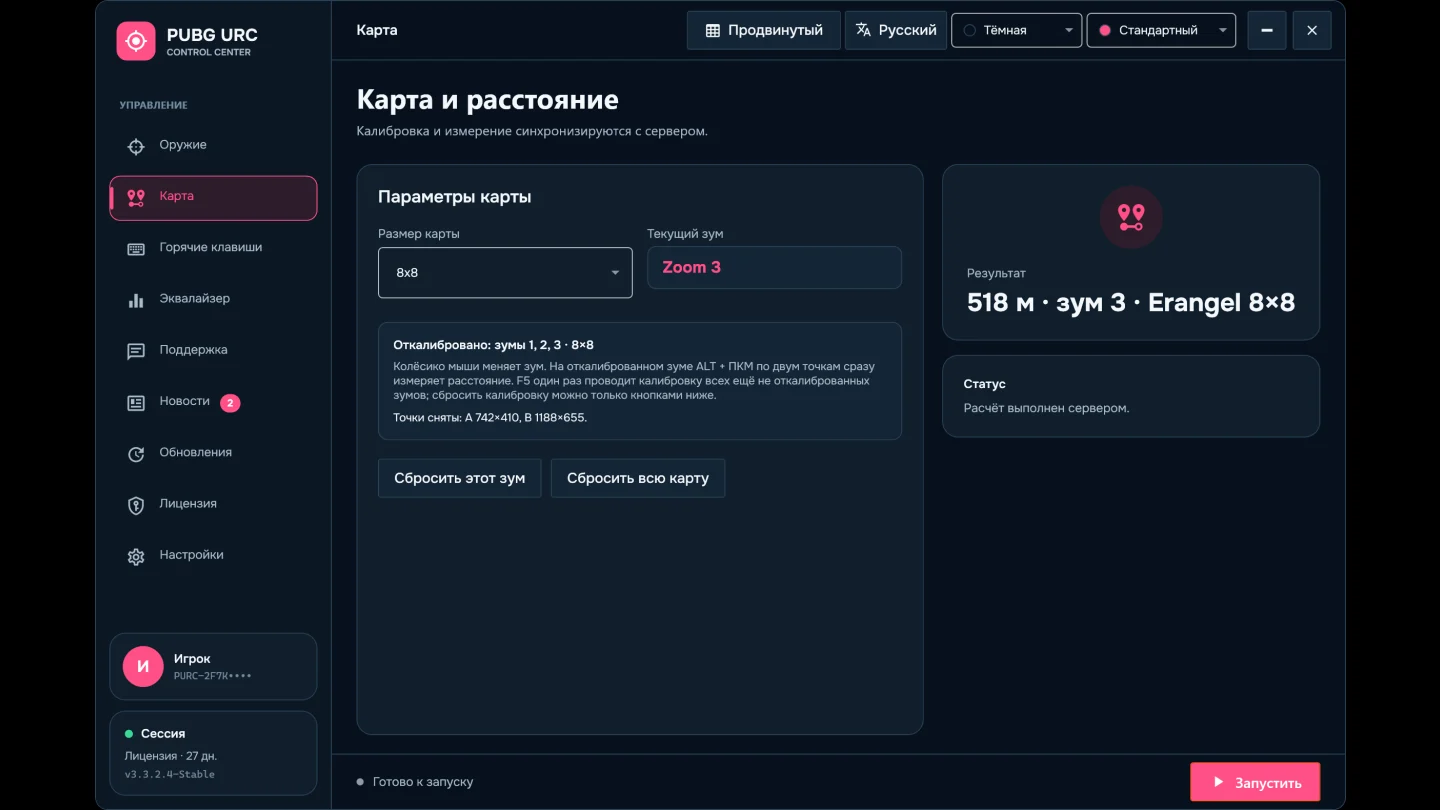
MAPMap calibration and distanceMeasure the distance to any point on any map size and zoom.
  • Maps of 8×8, 4×4, 3×3 and 2×2 and five zoom levels are supported. In map mode the mouse wheel changes zoom and F7 switches the map.
  • Calibration: F5 walks through every zoom not calibrated yet in one pass — you only mark the corners of a grid square.
  • Measurement: on a calibrated zoom, ALT + RMB on two points shows the distance right away. F8 clears the points.
  • Calibrations are stored on the server and come back in every new session.
  • One zoom or the whole map can be reset with the buttons on the map page, after confirmation.
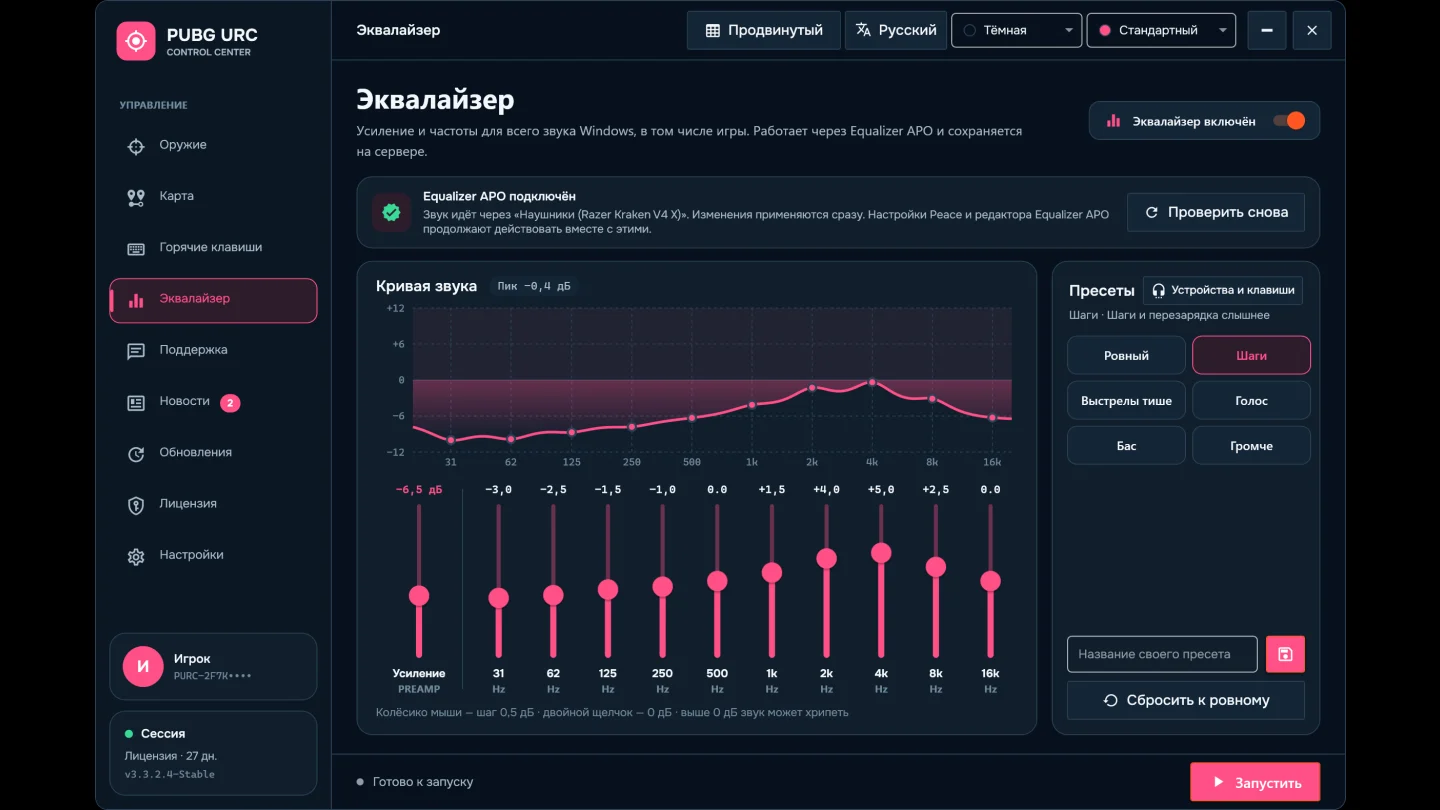
EQEqualizerGame volume and frequencies — so footsteps come through clearer.
  • A section of its own: overall gain and ten frequency bands from 31 Hz to 16 kHz for all Windows sound, the game included.
  • The sound is processed by the free Equalizer APO, driven from its own tab in the application. Changes are heard at once, without restarting the game.
  • The graph shows the resulting sound curve. When part of it goes above 0 dB and may distort, “Remove overload” corrects the gain.
  • Ready presets — Footsteps, Softer gunshots, Voice, Bass, Louder — and up to 20 of your own.
  • Settings and your presets are saved to the server and come back on another computer.
  • Already using Peace? The section shows its settings, and you can change them in the application or in Peace — they are shared.
  • F6 turns the equalizer on and off at any time, even with the mode off. F9, F10 and F11 apply chosen presets right in the game.
  • Headphones and speakers can each keep their own sound; it switches on by itself when the device changes.
KEYSHotkeysAny action can be moved to a key that suits you.
  • Select an action, then press the new key. One key can never belong to two actions.
  • Crouch, prone, inventory, map and RMB aim each work as hold or toggle — your choice.
  • Clear a single assignment or restore every default with one button.
  • Default keys are listed in the table below.
LICENSELicense, devices and customer cabinetTime left, session and linked computers always in view.
  • The License page shows the access type, time remaining, expiry date and current session.
  • A license is linked to a computer. A device can be unlinked in the application or the cabinet at most once a day; a new link becomes available after 48 hours.
  • The session renews on its own, so work is not interrupted even after many hours of play.
  • “Customer cabinet” opens the cabinet on the website through a one-time link, with no key to type. The cabinet holds your name and avatar, password, devices, the matrix with export and import, history and updates.
  • The name and avatar from the cabinet appear on the application’s account card.
  • The cabinet shows statistics — hours in the application and favourite weapons — and invitations: a friend who buys a license adds days to yours.
  • The @pubgurcbot Telegram bot is your cabinet in Telegram: license term, devices, support, matrix and sign-in alerts. Connect it with a short code from the application or the cabinet.
SETUPSettings, clubs and system checkEverything that keeps the application working on any computer.
  • Hotkeys, modes, notifications, theme and language are saved with the account and appear on another computer by themselves.
  • Club computer mode: the key is not saved, and on exit the application closes the session and resets its settings. “Sign out and erase my data” removes everything from the computer.
  • The system check finds the usual causes in seconds: a wrong clock, no connection, PUBG running as administrator, fullscreen hiding notifications, duplicate keys.
  • The result goes to support with one button — keys and tokens are never included.
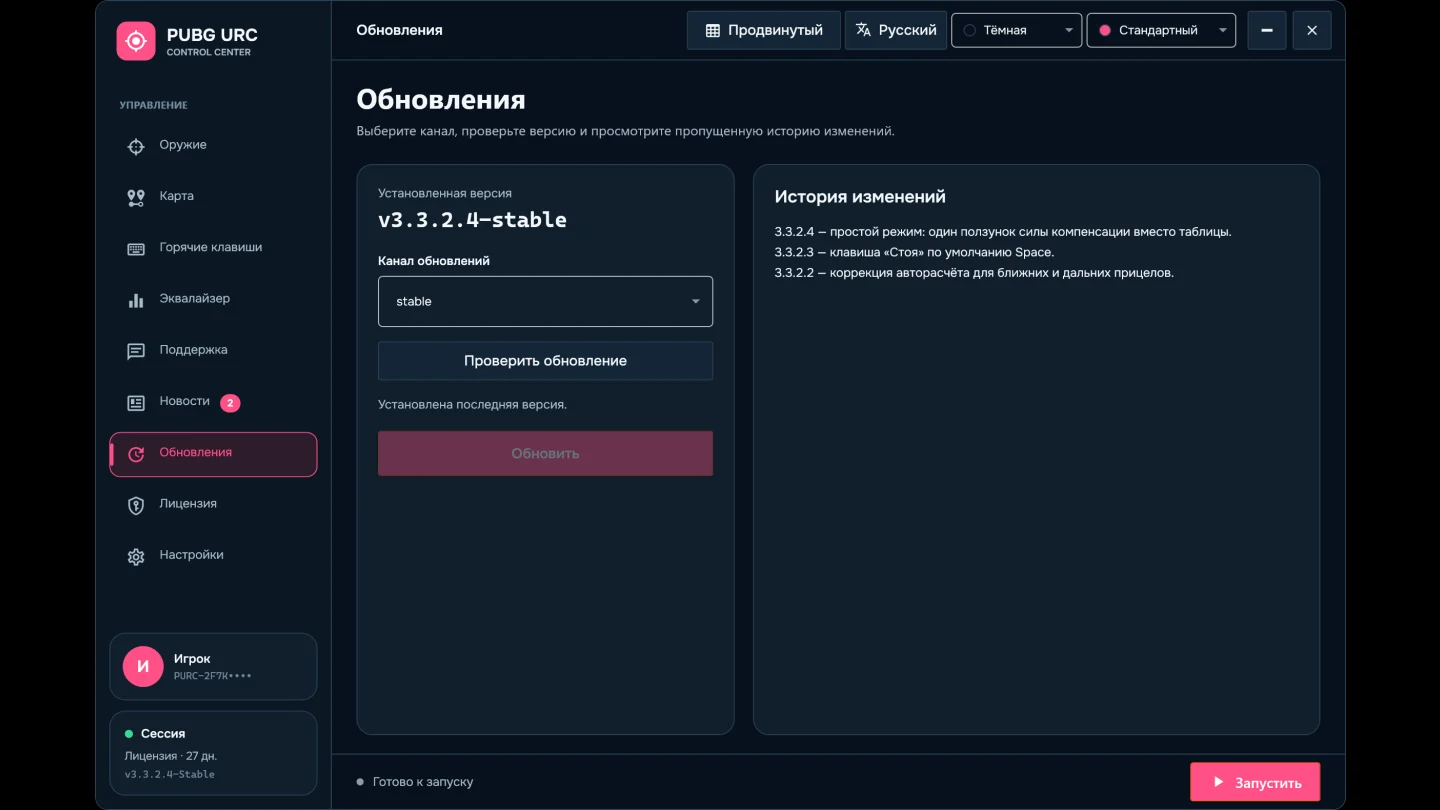
UPDATEUpdatesA new version installs in one click and is verified before it runs.
  • Two channels: Stable for proven versions, Test for new features ahead of everyone else.
  • The application tells you about a new version and shows every change you missed.
  • Before installing, the package is checked against its SHA-256 checksum. If the download breaks or the file is damaged, the current version stays untouched.
  • After installing, the application restarts on its own.
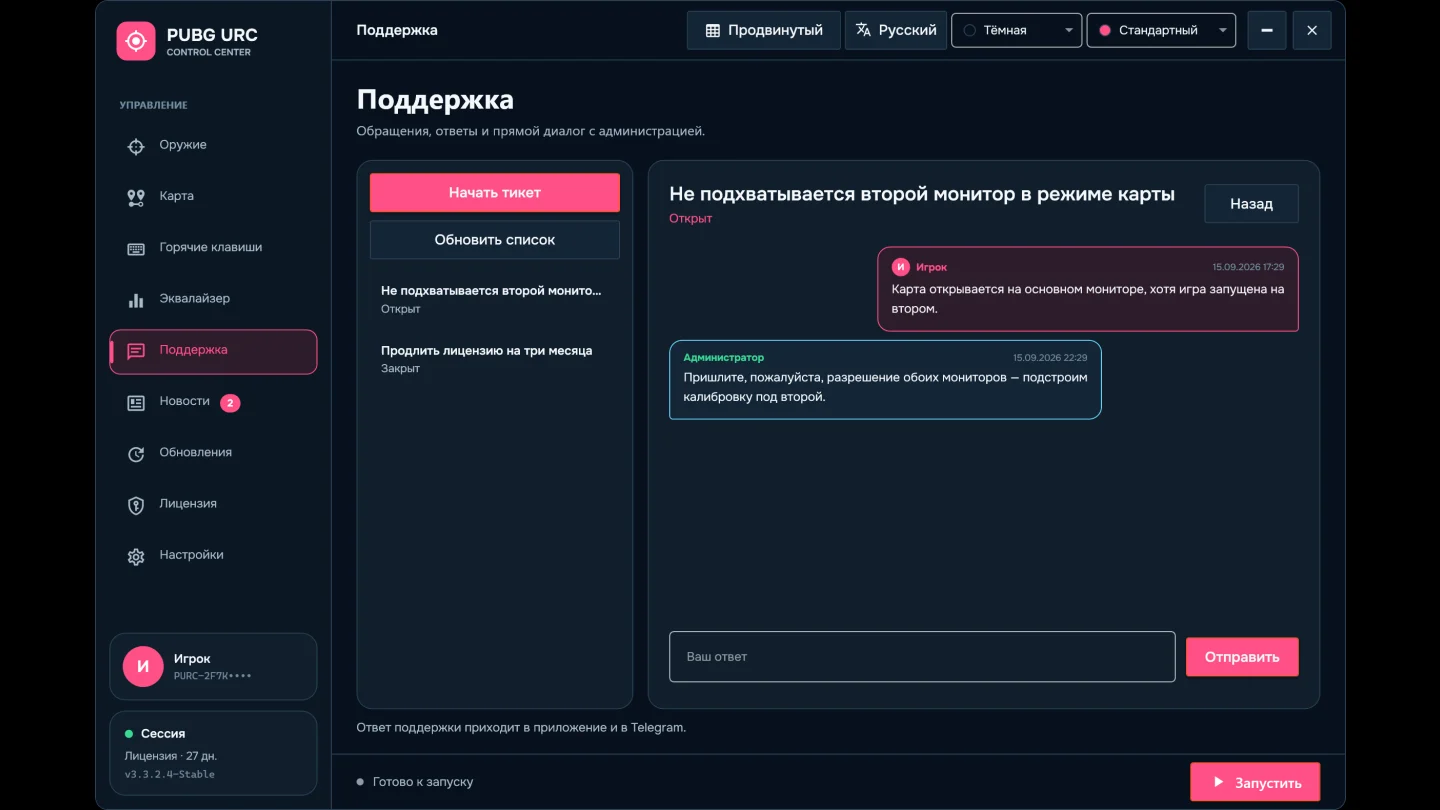
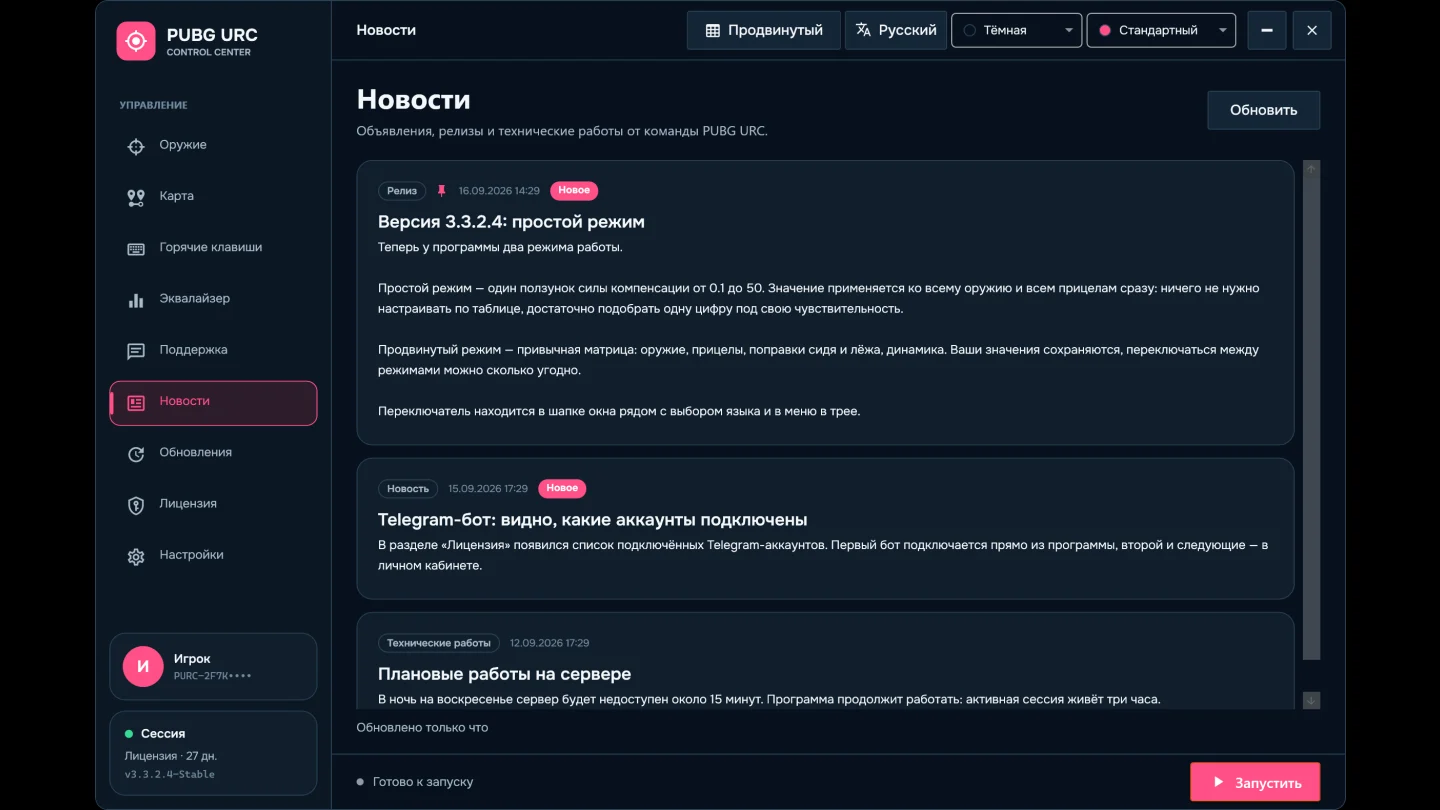
SUPPORTSupport and newsAsk the team and read announcements without leaving the application.
  • Open a ticket right in the application and keep the conversation with administration going. You get a notification when they reply.
  • News collects announcements, releases and maintenance. Pinned posts come first and the unread count shows in the menu.
LINKServer connectionA connection problem never looks like a lost license.
  • During maintenance the application shows the team’s message and the expected end time, and reconnects on its own once it is over.
  • If the server cannot be reached or the internet drops, the application says so and keeps retrying. Do not enter the key again — that can reset a working license.
  • A wrong clock on the computer does not block sign-in. If the date is far off, the application asks you to check it.
STYLEAppearance and languageTheme, accent and language to your taste.
  • Dark and light themes with six accents: default, green, orange, red, blue and silver.
  • Russian and English interface; the language switches without a restart.
  • Theme, accent and language are remembered between launches.

Default keys

Any key can be reassigned on the Hotkeys page.

Mode
F1
Enable / disable
F2
Emergency stop
F6
Equalizer on / off
F9 F10 F11
Sound presets
Weapons
F3
Next weapon
F4
Next category
← →
Change scope
↑ ↓
Y speed ±0.15
Stance
Space
Stand up
C
Crouch
Z
Prone
Game screens
Tab
Inventory
M
Map
Esc
Leave inventory or map
On the map
F5
Calibrate zooms
ALT + RMB
Measurement point
F7
Next map
F8
Clear points

Frequently asked questions

Do I need to keep the application window open?

No. Turn the mode on with F1 and close the window — the application keeps running from the tray. Double-click the icon to open it again, or choose “Exit application” in its menu to quit completely.

Will my settings survive a Windows reinstall or a new computer?

Yes. The matrix, map calibrations, equalizer, hotkeys, theme and language are kept with the account and return right after activation.

Can I use one license on two computers?

A license works on one computer. To move it, unlink the old device in the application or the cabinet — a new link becomes available after 48 hours.

The application says the server is unavailable. Is my license gone?

No. The key is saved on the computer and the application keeps reconnecting. Do not enter the key or a promo code again — just wait for the connection.

What does the equalizer need?

The free Equalizer APO. Install it, tick your headphones or speakers at the end of the setup and restart the computer — everything else is set up on the Equalizer tab, which tells you if something is missing.

My antivirus blocks the file. What should I do?

It is a false positive. Add the application to your antivirus exclusions — see the Antivirus section below.

What happens when I open the inventory or the map?

Movement pauses so it does not get in the way of items or the map. When you leave, the application returns to the running mode on its own.

CONNECTED BY DESIGN

Every module continues the one before it.

Licenses, configurations, calibrations, and updates pass through the server. Update packages are verified with SHA-256 before launch.

  • SYNCProfiles persistSettings and calibrations synchronize with the server and return after restart.
  • MAPZoom calibrationIndependent values for map sizes and zoom levels.
  • LOOTAuto-loot (experimental)Automatically moves items from the ground into the inventory: in inventory mode hold LMB and items transfer in a loop.
  • KEYHotkey controlSwitch modes without returning to the main window.
  • UPDVerified updatesStable and test channels with integrity checks for every package.
  • CHATSupport insideOpen a request and keep the conversation inside the application.
  • DEVICEDevice controlSessions and authorized computers stay under the license limit.
FULL ACCESS

The complete product. For the time you choose.

Every access period includes the full feature set. Choose a duration and arrange access directly through Telegram.

Settlement currencyPick a currency and the prices are recalculated at the current rate.

Rates updated 20.09.2026 04:00 — Rates are indicative; the final amount is confirmed at checkout.

FALSE POSITIVE

Why can antivirus software flag the application?

It is a false positive. Here are the main reasons.

HEURISTICS

Heuristic analysis

The scanner sees unusual behaviour — programmatic mouse control.

OBFUSCATION

Code obfuscation

Anti-tamper protection looks the same to a scanner as malicious code hiding itself.

SINGLE FILE

Single-file packaging

Every library ships inside one EXE, so the scanner suspects a packer.

SYSTEM HOOKS

System hooks

The standard technique for mouse and keyboard input, which scanners treat with suspicion.

What to do if your antivirus blocks the program?

No need to worry: it is a false positive. Add the file to your antivirus exclusions.

  1. 01Open your antivirus
  2. 02Find the exclusions section
  3. 03Add our EXE file
  4. 04Restart the program

The SHA-256 checksum of every build is published in the application — verify it before launch.

READY WHEN YOU ARE

Your profile already knows where to continue.

Get a key, shape your control surface, and return to saved parameters in every new session.

Message on Telegram